---
title: "Coach Feed: Desktop access to your players’ videos"
description: Discover the Coach Area in the Wingfield Admin Dashboard. Full desktop access to your players’ sessions with intuitive video navigation.
image: https://help.wingfield.io/hubfs/Preview%20Images/headerHelpcenter.jpg
---
[Skip to content](https://help.wingfield.io/en/dashboard/coach-feed#main-content)
- [English](https://help.wingfield.io/en/dashboard/coach-feed)
- [Deutsch](https://help.wingfield.io/dashboard/coach-feed)
- [Português - Brasil](https://help.wingfield.io/pt-br/dashboard/coach-feed)
English
Show submenu for translations
[](https://help.wingfield.io/en?hsLang=en)
Open main navigation
Close main navigation
- - [English](https://help.wingfield.io/en/dashboard/coach-feed)
- [Deutsch](https://help.wingfield.io/dashboard/coach-feed)
- [Português - Brasil](https://help.wingfield.io/pt-br/dashboard/coach-feed)
English
Show submenu for translations
- [Contact us](mailto:service@my-wingfield.com)
[Contact us](mailto:service@my-wingfield.com)
Hey! How can we help you?
- There are no suggestions because the search field is empty.
1. [Wingfield Help Center](https://help.wingfield.io/en?hsLang=en)
2. [Club resources](https://help.wingfield.io/en/club-resources?hsLang=en)
3. [Admin dashboard](https://help.wingfield.io/en/club-resources?hsLang=en#admin-dashboard)
December 1, 2025
# Coach Feed: Desktop access to your players’ videos
## Discover the Coach Area in the Wingfield Admin Dashboard. Full desktop access to your players’ sessions with intuitive video navigation.
As a**[coach account](https://help.wingfield.io/en/coach-account?hsLang=en)** user, you can also access your players’ sessions from your desktop. Simply log in to the **[Coach Dashboard](https://app.wingfield.io/login)** using your credentials.
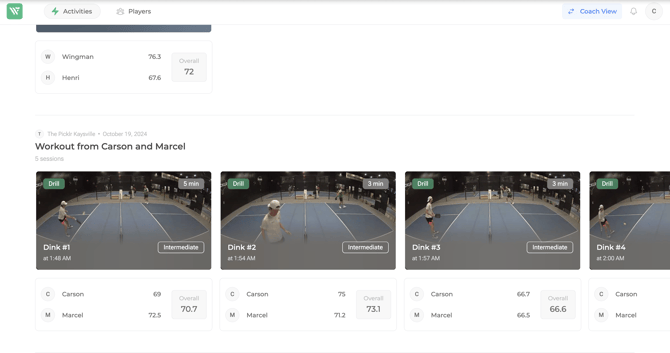
**☝🏻 By the way:** If you are not only a coach but also an admin at your club, you can access your Coach Feed via the same URL as the Admin Dashboard. In this case, you’ll see a button in the top navigation bar that lets you switch between the admin and coach views.

### Activities
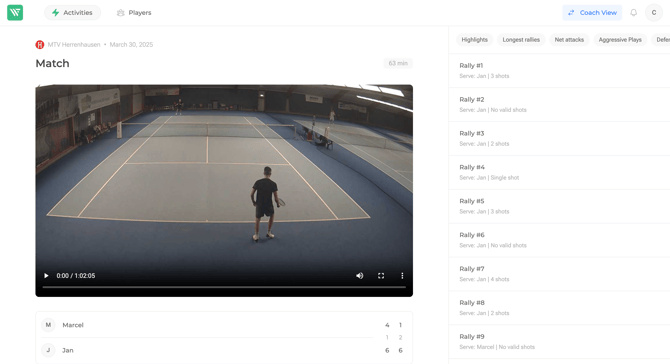
All session videos appear in your feed. Please note that statistics for sessions recorded with a Wingfield Pro system are currently not displayed here. You can switch your feed view between *Workouts* and *Sessions* using the menu at the top.
Clicking on a session takes you to the video player. In the **Rally Picker** on the right, you can filter your video or jump directly to specific rallies.
When a filter is active, all rallies matching that filter are highlighted in the list. Click  at the bottom of the video to hide all remaining rallies.
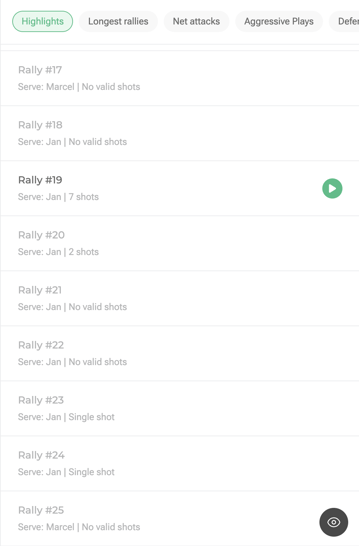
**⚠️ Attention:** Available filters may vary depending on the sport (tennis, padel, pickleball) or mode (match, drill, freeplay, etc.). The type of Wingfield cameras installed on the court also affects which filters are available (only Wingfield Pro provides the full filter set).
### **Players**
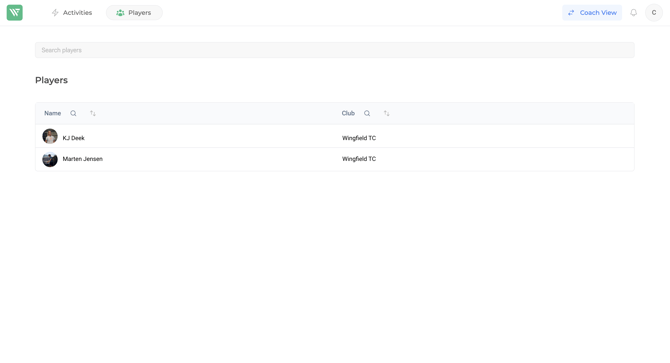
In general, the Coach Dashboard offers the same functionalities as the mobile app — you can search for players, connect with them, or remove an existing connection.
****
- [First steps with Wingfield](https://help.wingfield.io/en/first-steps-with-wingfield?hsLang=en#main-content)
- [Before Your First Wingfield Session](https://help.wingfield.io/en/first-steps-with-wingfield?hsLang=en#before-your-first-wingfield-session)
- [On the court](https://help.wingfield.io/en/first-steps-with-wingfield?hsLang=en#on-the-court)
- [About the Wingfield app](https://help.wingfield.io/en/about-the-wingfield-app?hsLang=en#main-content)
- [👤 Account & roles](https://help.wingfield.io/en/about-the-wingfield-app?hsLang=en#account-roles)
- [💬 App FAQ's](https://help.wingfield.io/en/about-the-wingfield-app?hsLang=en#app-faqs)
- [📲 Updates](https://help.wingfield.io/en/about-the-wingfield-app?hsLang=en#updates)
- [DUPR](https://help.wingfield.io/en/about-the-wingfield-app?hsLang=en#dupr)
- [Installation](https://help.wingfield.io/en/installation?hsLang=en#main-content)
- [Preparations](https://help.wingfield.io/en/installation?hsLang=en#preparations)
- [Installation Guide - Streaming Camera](https://help.wingfield.io/en/installation?hsLang=en#installation-guide-streaming-camera)
- [Installation Guide - Court Terminal](https://help.wingfield.io/en/installation?hsLang=en#installation-guide-court-terminal)
- [Installation Guide - Dual Tracking Camera](https://help.wingfield.io/en/installation?hsLang=en#installation-guide-dual-tracking-camera)
- [Troubleshooting](https://help.wingfield.io/en/installation?hsLang=en#troubleshooting)
- [Maintenance & Upgrades](https://help.wingfield.io/en/installation?hsLang=en#maintenance-upgrades)
- [Installation Guide Wingfield Box (Tennis)](https://help.wingfield.io/en/installation?hsLang=en#installation-guide-wingfield-box-tennis)
- [Installation Guide Wingfield Box (Pickleball)](https://help.wingfield.io/en/installation?hsLang=en#installation-guide-wingfield-box-pickleball)
- [Coach Corner](https://help.wingfield.io/en/coach-corner?hsLang=en#main-content)
- [Tools for coaches](https://help.wingfield.io/en/coach-corner?hsLang=en#tools-for-coaches)
- [Coaching with Wingfield](https://help.wingfield.io/en/coach-corner?hsLang=en#coaching-with-wingfield)
- [Blueprints for Drills](https://help.wingfield.io/en/coach-corner?hsLang=en#blueprints-for-drills)
- [Club resources](https://help.wingfield.io/en/club-resources?hsLang=en#main-content)
- [Financing & refinancing](https://help.wingfield.io/en/club-resources?hsLang=en#financing-refinancing)
- [Marketing](https://help.wingfield.io/en/club-resources?hsLang=en#marketing)
- [Admin dashboard](https://help.wingfield.io/en/club-resources?hsLang=en#admin-dashboard)
- [Operations](https://help.wingfield.io/en/club-resources?hsLang=en#operations)
- [DTB LK-Matches](https://help.wingfield.io/en/dtb-lk-matches?hsLang=en#main-content)
- [Basics](https://help.wingfield.io/en/dtb-lk-matches?hsLang=en#basics)
- [DTB rules](https://help.wingfield.io/en/dtb-lk-matches?hsLang=en#dtb-rules)
- [Match validation](https://help.wingfield.io/en/dtb-lk-matches?hsLang=en#match-validation)
- [Marketing tips for clubs](https://help.wingfield.io/en/dtb-lk-matches?hsLang=en#marketing-tips-for-clubs)
- [FAQ](https://help.wingfield.io/en/faq?hsLang=en)
- [Campaigns](https://help.wingfield.io/en/campaigns?hsLang=en)
- [General](https://help.wingfield.io/en/general?hsLang=en)
[](https://help.wingfield.io/?hsLang=en)
Copyright © 2025, © Wingfield GmbH