---
title: No internet connection at the Wingfield Box
description: You get a notification in setup mode that the Wingfield Box cannot connect to the Internet? These could be possible reasons.
image: https://help.wingfield.io/hubfs/Preview%20Images/headerHelpcenter.jpg
---
[Skip to content](https://help.wingfield.io/en/internet-connection#main-content)
- [English](https://help.wingfield.io/en/internet-connection)
- [Deutsch](https://help.wingfield.io/internet-connection)
English
Show submenu for translations
[](https://help.wingfield.io/en?hsLang=en)
Open main navigation
Close main navigation
- - [English](https://help.wingfield.io/en/internet-connection)
- [Deutsch](https://help.wingfield.io/internet-connection)
English
Show submenu for translations
- [Contact us](mailto:service@my-wingfield.com)
[Contact us](mailto:service@my-wingfield.com)
Hey! How can we help you?
- There are no suggestions because the search field is empty.
1. [Wingfield Help Center](https://help.wingfield.io/en?hsLang=en)
2. [Installation](https://help.wingfield.io/en/installation?hsLang=en)
3. [Troubleshooting](https://help.wingfield.io/en/installation?hsLang=en#troubleshooting)
February 14, 2023
# No internet connection at the Wingfield Box
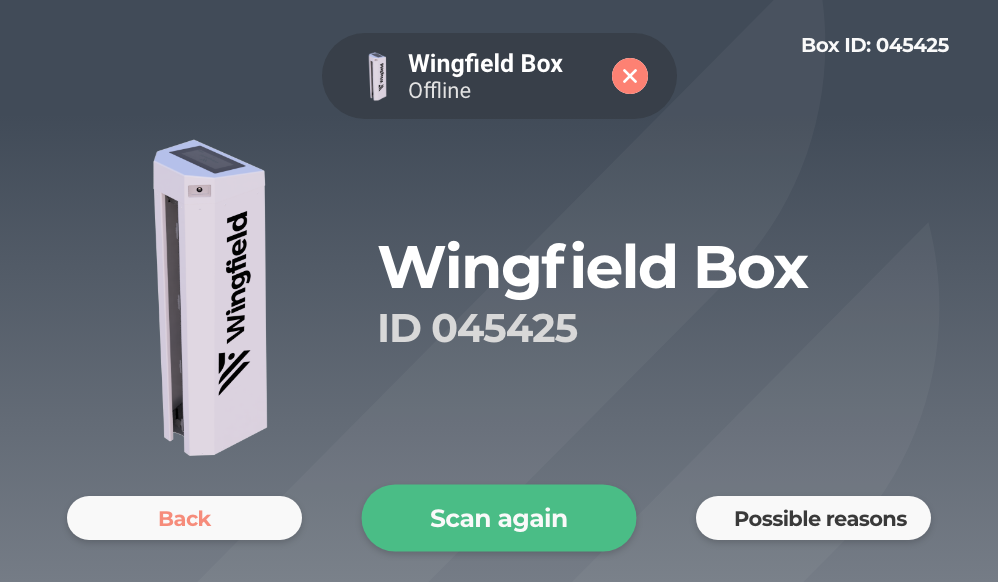
## You get a notification in setup mode that the Wingfield Box cannot connect to the Internet? These could be possible reasons.
**How did you connect your Wingfield Box to your network?**
**[➡️ Connection via WIFI](https://help.wingfield.io/en/internet-connection#en-wifi)**
[**➡️ Connection via LAN cable**](https://help.wingfield.io/en/internet-connection#en-lan)
****
### Connection via WIFI
#### The signal is too weak.
If the signal is too weak, the Wingfield Box may not be able to connect to your network permanently. In case of a weak signal, you have the following options:
- **Extend the network: [WiFi repeaters](https://help.wingfield.io/en/internetsolutions?hsLang=en#wifi-repeater)** (especially indoors) and so-called [**mesh systems**](https://help.wingfield.io/en/internetsolutions?hsLang=en#mesh-system) (especially outdoors) can be an option to extend your WiFi signal over a greater distance.
- **LAN cable:** You will always have the most reliable connection with a direct cable between the Wingfield Box and your router.
- **Mobile Internet:** If a direct connection between the Wingfield Box and your router via LAN cable is impossible, you can always consider one of our **[recommended mobile internet solutions](https://help.wingfield.io/en/internetsolutions?hsLang=en#mobile-data)**.
- **Performance too low:** Ask your network provider whether the technical infrastructure at your facility (e.g. fibre optic connection, cabling, etc.) would generally allow higher performance and whether an outdated data contract does not limit this.
**💡Tip:** Connect to your WIFI via smartphone at the location of your Wingfield Box and conduct a **[speed test](https://www.speedtest.net/)** to ensure that the signal is really too weak and thus the critical factor.
**☝🏼By the way:** Our recommended minimum upload speed is 10mbit/s.
#### Firewall or router settings block traffic.
In your network settings, please allow outbound ports 22, 443, 8088 and 8884 access to our server (172.104.6.188) and inbound ports 80 and 443 TCP access to the WAN to prevent your firewall from blocking traffic to new devices on the network.
**☝🏼By the way:** Usually, these things are enabled in the network settings anyway. However, if you have defined stricter rules yourself, this problem can occur.
**💡 Tip:** If you have questions about your network, your system administrator or IT specialist is the right person to contact.

**📞 Service hotline:** [+49 511 51525901](tel:+4951151525901)
**💬 WhatsApp:** [click here](https://wa.me/message/IZ2CTUJIXCGZK1)
**📨 E-Mail:** [service@wingfield.io](mailto:service@wingfield.io)
### Connection via LAN cable.
#### Cable is not plugged in correctly.
Check that the LAN cable is plugged into both your Wingfield Box and your router correctly.
**💡Tip:** Disconnect the cable connection once or restart your router. Wait a moment, as the Wingfield Box automatically scans the network every few seconds.
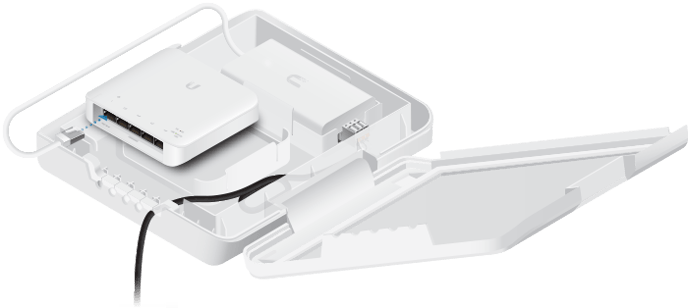
**⚠️ Attention:** If you want to use your Wingfield Box with a **[Baseline Camera](https://help.wingfield.io/en/ip-camera?hsLang=en)**, the LAN cable from the router must be plugged into the switch supplied instead of directly into the Wingfield Box.
It doesn't matter which port you plug the LAN cable of the camera and the router into the switch. Nevertheless, try a different input - sometimes, this helps.
#### Firewall or router settings block traffic.
In your network settings, please allow outbound ports 22, 443, 8088 and 8884 access to our server (172.104.6.188) and inbound ports 80 and 443 TCP access to the WAN to prevent your firewall from blocking traffic to new devices on the network.
**☝🏼By the way:** Usually, these things are enabled in the network settings anyway. However, if you have defined stricter rules yourself, this problem can occur.
**💡 Tip:** If you have questions about your network, your system administrator or IT specialist is the right person to contact.
#### Cable damaged.
Especially in outdoor installations, the LAN cable may have been damaged. Check whether the cable has visible damage and replace it if in doubt.
**💡 Tip:** As a general rule, try to avoid the cables twisting too much into each other or dragging their contacts across the floor during installation.

**📞 Service hotline:** [+49 511 51525901](tel:+4951151525901)
**💬 WhatsApp:** [click here](https://wa.me/message/IZ2CTUJIXCGZK1)
**📨 E-Mail:** [service@wingfield.io](mailto:service@wingfield.io)
- [First steps with Wingfield](https://help.wingfield.io/en/first-steps-with-wingfield?hsLang=en#main-content)
- [Before Your First Wingfield Session](https://help.wingfield.io/en/first-steps-with-wingfield?hsLang=en#before-your-first-wingfield-session)
- [On the court](https://help.wingfield.io/en/first-steps-with-wingfield?hsLang=en#on-the-court)
- [About the Wingfield app](https://help.wingfield.io/en/about-the-wingfield-app?hsLang=en#main-content)
- [👤 Account & roles](https://help.wingfield.io/en/about-the-wingfield-app?hsLang=en#account-roles)
- [💬 App FAQ's](https://help.wingfield.io/en/about-the-wingfield-app?hsLang=en#app-faqs)
- [📲 Updates](https://help.wingfield.io/en/about-the-wingfield-app?hsLang=en#updates)
- [DUPR](https://help.wingfield.io/en/about-the-wingfield-app?hsLang=en#dupr)
- [Installation](https://help.wingfield.io/en/installation?hsLang=en#main-content)
- [Preparations](https://help.wingfield.io/en/installation?hsLang=en#preparations)
- [Installation Guide - Streaming Camera](https://help.wingfield.io/en/installation?hsLang=en#installation-guide-streaming-camera)
- [Installation Guide - Court Terminal](https://help.wingfield.io/en/installation?hsLang=en#installation-guide-court-terminal)
- [Installation Guide - Dual Tracking Camera](https://help.wingfield.io/en/installation?hsLang=en#installation-guide-dual-tracking-camera)
- [Troubleshooting](https://help.wingfield.io/en/installation?hsLang=en#troubleshooting)
- [Maintenance & Upgrades](https://help.wingfield.io/en/installation?hsLang=en#maintenance-upgrades)
- [Installation Guide Wingfield Box (Tennis)](https://help.wingfield.io/en/installation?hsLang=en#installation-guide-wingfield-box-tennis)
- [Installation Guide Wingfield Box (Pickleball)](https://help.wingfield.io/en/installation?hsLang=en#installation-guide-wingfield-box-pickleball)
- [Coach Corner](https://help.wingfield.io/en/coach-corner?hsLang=en#main-content)
- [Tools for coaches](https://help.wingfield.io/en/coach-corner?hsLang=en#tools-for-coaches)
- [Coaching with Wingfield](https://help.wingfield.io/en/coach-corner?hsLang=en#coaching-with-wingfield)
- [Blueprints for Drills](https://help.wingfield.io/en/coach-corner?hsLang=en#blueprints-for-drills)
- [Club resources](https://help.wingfield.io/en/club-resources?hsLang=en#main-content)
- [Financing & refinancing](https://help.wingfield.io/en/club-resources?hsLang=en#financing-refinancing)
- [Marketing](https://help.wingfield.io/en/club-resources?hsLang=en#marketing)
- [Admin dashboard](https://help.wingfield.io/en/club-resources?hsLang=en#admin-dashboard)
- [Operations](https://help.wingfield.io/en/club-resources?hsLang=en#operations)
- [DTB LK-Matches](https://help.wingfield.io/en/dtb-lk-matches?hsLang=en#main-content)
- [Basics](https://help.wingfield.io/en/dtb-lk-matches?hsLang=en#basics)
- [DTB rules](https://help.wingfield.io/en/dtb-lk-matches?hsLang=en#dtb-rules)
- [Match validation](https://help.wingfield.io/en/dtb-lk-matches?hsLang=en#match-validation)
- [Marketing tips for clubs](https://help.wingfield.io/en/dtb-lk-matches?hsLang=en#marketing-tips-for-clubs)
- [FAQ](https://help.wingfield.io/en/faq?hsLang=en)
- [Campaigns](https://help.wingfield.io/en/campaigns?hsLang=en)
- [General](https://help.wingfield.io/en/general?hsLang=en)
[](https://help.wingfield.io/?hsLang=en)
Copyright © 2025, © Wingfield GmbH