---
title: Embed sponsor & club logos in your Wingfield inventory
description: Boost the reach of your club brand or partners by adding logo overlays to all highlight videos recorded on your courts.
image: https://help.wingfield.io/hubfs/Preview%20Images/headerHelpcenter.jpg
---
[Skip to content](https://help.wingfield.io/en/marketing/logo-integration#main-content)
- [English](https://help.wingfield.io/en/marketing/logo-integration)
- [Deutsch](https://help.wingfield.io/marketing/logo-integration)
- [Português - Brasil](https://help.wingfield.io/pt-br/marketing/logo-integration)
English
Show submenu for translations
[](https://help.wingfield.io/en?hsLang=en)
Open main navigation
Close main navigation
- - [English](https://help.wingfield.io/en/marketing/logo-integration)
- [Deutsch](https://help.wingfield.io/marketing/logo-integration)
- [Português - Brasil](https://help.wingfield.io/pt-br/marketing/logo-integration)
English
Show submenu for translations
- [Contact us](mailto:service@my-wingfield.com)
[Contact us](mailto:service@my-wingfield.com)
Hey! How can we help you?
- There are no suggestions because the search field is empty.
1. [Wingfield Help Center](https://help.wingfield.io/en?hsLang=en)
2. [Club resources](https://help.wingfield.io/en/club-resources?hsLang=en)
3. [Marketing](https://help.wingfield.io/en/club-resources?hsLang=en#marketing)
May 16, 2026
# Embed sponsor & club logos in your Wingfield inventory
## Here you'll find an overview of all marketable ad positions on the Wingfield platform, including technical asset requirements for a clean integration.
You sell naming rights and advertising space at your courts exclusively to sponsors? Expand the marketable inventory of your sponsorship packages with premium placements on the Wingfield platform and create additional digital touchpoints for your brand.
### Position 1: Logo on the homescreen of your Wingfield Court
**Available for:** Wingfield Cam+ and Wingfield AI Pro
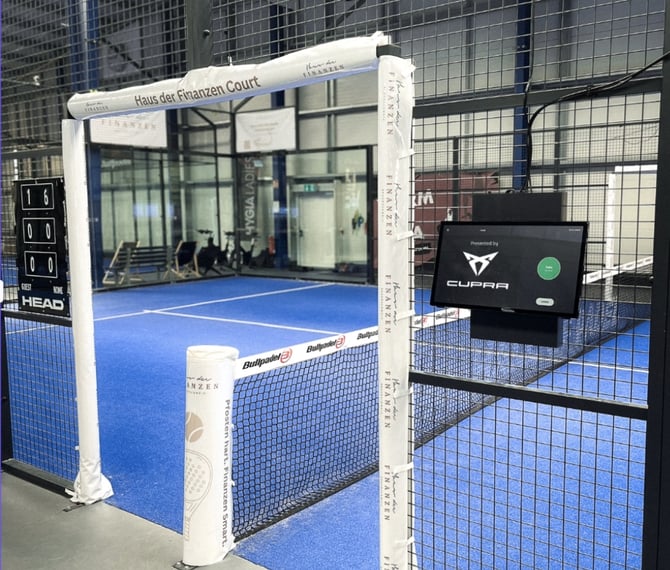
The homescreen is the first touchpoint your players have with Wingfield. Use the open slot in the content rotation on the left side of the screen to feature your court sponsor with an impactful "presented by" logo placement.
**💡 Tip:** For good contrast and optimal visibility, we recommend using a white version of the logo.
#### Position 2: Logo overlay in match videos & highlights
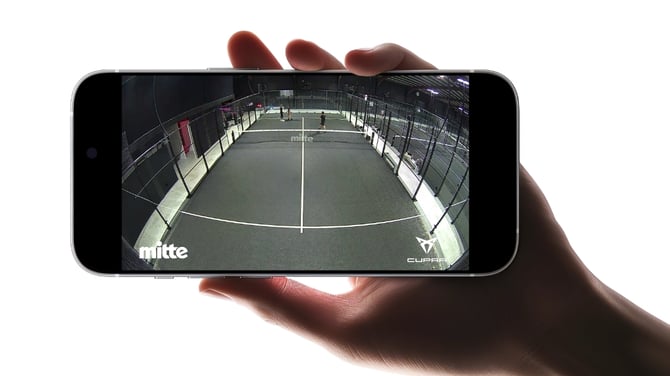
Add logo overlays from your club or sponsors to the videos recorded on your Wingfield courts. Each court can have its own individual logo combination – placement is fully flexible.
**💡 Tip:** When videos are shared vertically on social media, logos placed in the outer areas may be cropped out of the visible frame. If you're thinking "social first", we recommend placing the logo in one of the centre positions (top or bottom).
### How to update logos in your videos and court screens
To ensure a consistent quality standard for embedded logos, the setup currently runs through our support team:
1. **Provide your logo:** Send your PNG or SVG file via your Whatsapp support group or email to [**service@my-wingfield.com**](mailto:service@my-wingfield.com)
2. **Wingfield review:** We check the logo for quality, readability, and proper format.
3. **Integration iof your logos:** After approval, we assign the logo to your club so it appear at your chosen position
#### Logo requirements
To ensure your logo appears clean and professional in all highlight videos, please note the following requirements:
| **Color** | White (single color) |
| --- | --- |
| **Background** | Transparent |
| **File format** | Preferred **SVG** or **PNG** with background transparency |
| **Resolution (PNG)** | - Minimum **1000 px** wide (ideally 1500–2000 px), - No noisy or heaviliy compressed files |
**💡Tip:** Avoid very small text, claims, or slogans, as they are often difficult to read in videos. Instead, use a simplified version of your logo (icon + club name, if needed).
- [First steps with Wingfield](https://help.wingfield.io/en/first-steps-with-wingfield?hsLang=en#main-content)
- [Before Your First Wingfield Session](https://help.wingfield.io/en/first-steps-with-wingfield?hsLang=en#before-your-first-wingfield-session)
- [On the court](https://help.wingfield.io/en/first-steps-with-wingfield?hsLang=en#on-the-court)
- [About the Wingfield app](https://help.wingfield.io/en/about-the-wingfield-app?hsLang=en#main-content)
- [👤 Account & roles](https://help.wingfield.io/en/about-the-wingfield-app?hsLang=en#account-roles)
- [💬 App FAQ's](https://help.wingfield.io/en/about-the-wingfield-app?hsLang=en#app-faqs)
- [📲 Updates](https://help.wingfield.io/en/about-the-wingfield-app?hsLang=en#updates)
- [DUPR](https://help.wingfield.io/en/about-the-wingfield-app?hsLang=en#dupr)
- [Installation](https://help.wingfield.io/en/installation?hsLang=en#main-content)
- [Preparations](https://help.wingfield.io/en/installation?hsLang=en#preparations)
- [Installation Guide - Streaming Camera](https://help.wingfield.io/en/installation?hsLang=en#installation-guide-streaming-camera)
- [Installation Guide - Court Terminal](https://help.wingfield.io/en/installation?hsLang=en#installation-guide-court-terminal)
- [Installation Guide - Dual Tracking Camera](https://help.wingfield.io/en/installation?hsLang=en#installation-guide-dual-tracking-camera)
- [Troubleshooting](https://help.wingfield.io/en/installation?hsLang=en#troubleshooting)
- [Maintenance & Upgrades](https://help.wingfield.io/en/installation?hsLang=en#maintenance-upgrades)
- [Installation Guide Wingfield Box (Tennis)](https://help.wingfield.io/en/installation?hsLang=en#installation-guide-wingfield-box-tennis)
- [Installation Guide Wingfield Box (Pickleball)](https://help.wingfield.io/en/installation?hsLang=en#installation-guide-wingfield-box-pickleball)
- [Coach Corner](https://help.wingfield.io/en/coach-corner?hsLang=en#main-content)
- [Tools for coaches](https://help.wingfield.io/en/coach-corner?hsLang=en#tools-for-coaches)
- [Coaching with Wingfield](https://help.wingfield.io/en/coach-corner?hsLang=en#coaching-with-wingfield)
- [Blueprints for Drills](https://help.wingfield.io/en/coach-corner?hsLang=en#blueprints-for-drills)
- [Club resources](https://help.wingfield.io/en/club-resources?hsLang=en#main-content)
- [Financing & refinancing](https://help.wingfield.io/en/club-resources?hsLang=en#financing-refinancing)
- [Marketing](https://help.wingfield.io/en/club-resources?hsLang=en#marketing)
- [Admin dashboard](https://help.wingfield.io/en/club-resources?hsLang=en#admin-dashboard)
- [Operations](https://help.wingfield.io/en/club-resources?hsLang=en#operations)
- [DTB LK-Matches](https://help.wingfield.io/en/dtb-lk-matches?hsLang=en#main-content)
- [Basics](https://help.wingfield.io/en/dtb-lk-matches?hsLang=en#basics)
- [DTB rules](https://help.wingfield.io/en/dtb-lk-matches?hsLang=en#dtb-rules)
- [Match validation](https://help.wingfield.io/en/dtb-lk-matches?hsLang=en#match-validation)
- [Marketing tips for clubs](https://help.wingfield.io/en/dtb-lk-matches?hsLang=en#marketing-tips-for-clubs)
- [FAQ](https://help.wingfield.io/en/faq?hsLang=en)
- [Campaigns](https://help.wingfield.io/en/campaigns?hsLang=en)
- [General](https://help.wingfield.io/en/general?hsLang=en)
[](https://help.wingfield.io/?hsLang=en)
Copyright © 2025, © Wingfield GmbH