---
title: Streaming Camera Konfiguration und Ausrichtung
description: Diese Anleitung zeigt Dir, wie Du deine Streaming Cameras für verschiedene Setups konfigurierst – Wingfield Cam, Wingfield Cam+ und Wingfield AI Pro.
image: https://help.wingfield.io/hubfs/Preview%20Images/headerHelpcenter.jpg
---
[Zu Content springen](https://help.wingfield.io/streaming-camera/configuration#main-content)
- [Deutsch](https://help.wingfield.io/streaming-camera/configuration)
- [English (Englisch)](https://help.wingfield.io/en/streaming-camera/configuration)
Deutsch
Untermenü für Übersetzungen anzeigen
[](https://help.wingfield.io/?hsLang=de)
Hauptnavigation öffnen
Hauptnavigation schließen
- - [Deutsch](https://help.wingfield.io/streaming-camera/configuration)
- [English (Englisch)](https://help.wingfield.io/en/streaming-camera/configuration)
Deutsch
Untermenü für Übersetzungen anzeigen
- [Kontakt](mailto:service@my-wingfield.com)
[Kontakt](mailto:service@my-wingfield.com)
Hey! Wie können wir dir helfen?
- Es gibt keine Vorschläge, da das Suchfeld leer ist.
1. [Wingfield Help Center](https://help.wingfield.io/?hsLang=de)
2. [Installation](https://help.wingfield.io/installation?hsLang=de)
3. [Installationsanleitung - Streaming Camera](https://help.wingfield.io/installation?hsLang=de#installationsanleitung-streaming-camera)
9\. Oktober 2026
# Streaming Camera Konfiguration und Ausrichtung
## Diese Anleitung zeigt Dir, wie Du deine Streaming Cameras für verschiedene Setups konfigurierst – Wingfield Cam+ und Wingfield AI Pro.
**Diese Installationsanleitung gilt für folgende Systemtypen:**
- **✔ Wingfield Cam+**
- **✔ Wingfield AI Pro**
**In diesem Artikel erfährst Du:**
- ✔ Wie Du deine Streaming Camera am Court Screen konfigurierst (**🔗[Quick link](https://help.wingfield.io/streaming-camera/configuration#cam-configuration)**)
- ✔ Wie Du deine Streaming Camera ausrichtest (🔗[**Quick link**](https://help.wingfield.io/streaming-camera/configuration#cam-alignment))
**Wir empfehlen, die Kamera erst nach Abschluss der folgenden Schritte zu konfigurieren.**
- ✔ Dein Court Screen ist eingerichtet und mit Strom und dem Internet verbunden.
- ✔ Deine Streaming Camera ist montiert.
☝🏼 **Übrigens**: Sobald die Kamera in deinem Netzwerk erkannt und die Konfiguration abgeschlossen wurde, kannst Du sie für die Montage wieder abstecken.
#### Streaming Camera Konfiguration
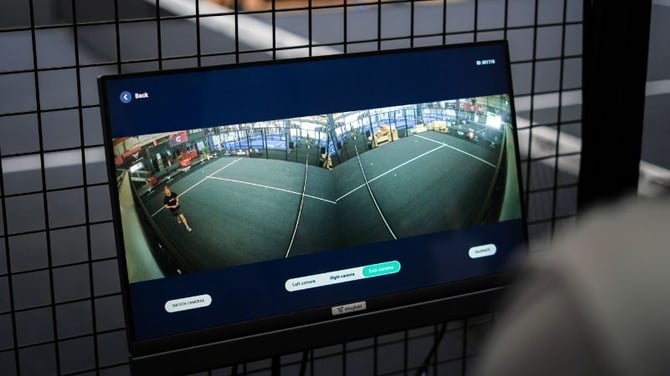
Du kannst das Livebild deiner Kameras auf dem Court Screen anzeigen lassen. So kannst du den Kamerawinkel und die Perspektive einfacher optimal einstellen.
1. Tippe auf dem Startbildschirm des Court Terminals auf das *⚙️-Symbol.*
2. Tippe auf die*Kamera*.
3. Füge deine *erste* bzw. *zweite* Kamera hinzu.
4. Gib die zuvor notierte *MAC-Adresse/S/N-Nummer* ein (je nach Kameramodell).
Sobald die Kamera verbunden ist, kannst du dir einen Live-Stream deiner Kamera auf dem Court Terminal anzeigen lassen, indem du auf*Kamera ausrichten*klickst.
⚠️ **Achtung**: Stelle sicher, dass die Ethernet-Kabel deiner Streaming Cam(s) mit den PoE-Ports deines Switches verbunden sind. Der Switch muss ebenfalls eingeschaltet und korrekt mit deinem Court Terminal verbunden sein.
⚠️ **Achtung**: Für die Konfiguration der Streaming Camera muss dein Court Terminal mit dem Internet verbunden sein
### So richtest du deine Streaming Cameras aus
Je nach Kameramodell – *HD Dome* oder *4K Bullet* – unterscheidet sich die Vorgehensweise zum Einstellen des Kamerawinkels.
**💡 Tipp:** Am besten macht ihr das zu zweit. Eine Person stellt den Kamerawinkel auf der Leiter ein, während die andere das Livebild auf dem Court Screen überprüft und Anweisungen gibt.
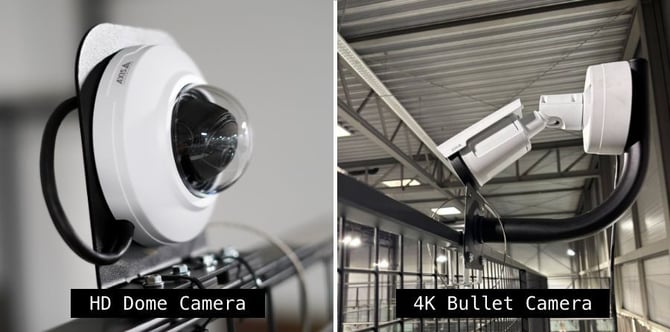
#### a) Ausrichtung der HD Dome Camera
1. Drehe die **Glaskuppel** ab.
2. Drehe zunächst das **Objektiv**, bis der gewünschte Bildausschnitt zu sehen ist.
3. Passe den **horizontalen Winkel** an, damit das Bild nicht auf dem Kopf steht.
4. Stelle anschließend den **Neigungswinkel** so ein, dass der gewünschte Bildausschnitt abgedeckt wird.
5. Setze die Glaskuppel wieder auf die Kamera.
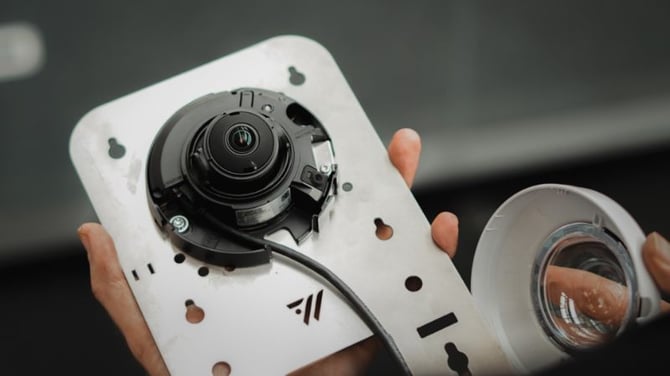
⚠️ **Achtung**: Drehe die Kamera niemals mit Gewalt. Andernfalls kann es aufgrund eines Motorfehlers zu einer fehlerhaften Fokussierung des Bildes kommen.
| 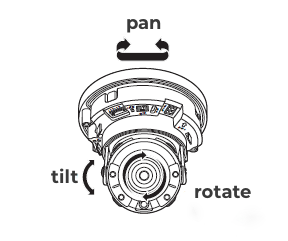 | **Pan** = Schwenken der Kamera nach links oder rechts |
| --- | --- |
| **Tilt** = Neigen der Kamera nach oben oder unten | |
| **Rotate** = Drehen des Objektivs um die eigene Achse | |
#### b) Ausrichtung der 4K Bullet Camera
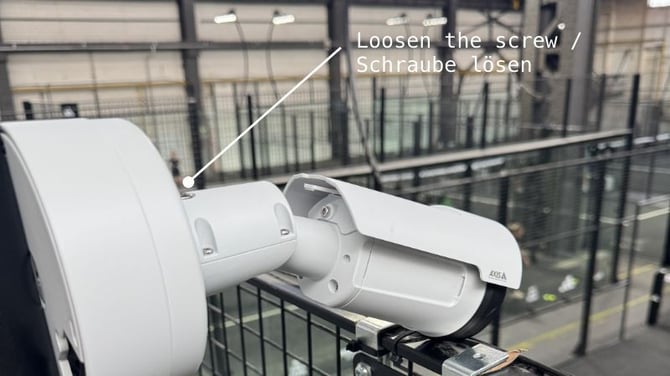
1. **Löse die Schraube** an der Oberseite der Kamera mit dem passenden Inbusschlüssel.
2. **Stelle den Neigungs- und horizontalen Winkel ein** und drehe anschließend die Kamera, bis der gewünschte Bereich im Bild zu sehen ist.
3. **Ziehe die Schraube wieder fest**, um die Kamera in der gewünschten Position zu fixieren.
#### Fehlt noch etwas?
Je nach Setup und der Reihenfolge, in der du die einzelnen Komponenten installierst, kannst du mit einem der folgenden Guides fortfahren:
- **[➡️ Dual Camera Module Installationsanleitung](https://help.wingfield.io/dcm-padel?hsLang=de)**[–](https://help.wingfield.io/dcm-padel?hsLang=de)[Padel Court](https://help.wingfield.io/dcm-padel?hsLang=de) *(nur Wingfield AI Pro)*
- **[➡️ Dual Camera Module Installationsanleitung](https://help.wingfield.io/dcm-pole?hsLang=de)**[– Pole](https://help.wingfield.io/dcm-pole?hsLang=de)*(nur Wingfield AI Pro)*
#### **Du stehst gerade auf dem Platz und weißt nicht mehr weiter? Wir sind für dich da!**
**📞 Service hotline: 🇺🇸** [+1 929 395 1078](tel:+19293951078) | 🇪🇺 [+49 511 51525901](tel:+4951151525901)
**💬 WhatsApp:** [hier klicken](https://wa.me/message/IZ2CTUJIXCGZK1)
**📨 E-Mail:** [service@wingfield.io](mailto:service@wingfield.io)
- [Erste Schritte mit Wingfield](https://help.wingfield.io/erste-schritte-mit-wingfield?hsLang=de#main-content)
- [Vor deiner ersten Session](https://help.wingfield.io/erste-schritte-mit-wingfield?hsLang=de#vor-deiner-ersten-session)
- [Auf dem Platz](https://help.wingfield.io/erste-schritte-mit-wingfield?hsLang=de#auf-dem-platz)
- [Rund um die Wingfield App](https://help.wingfield.io/rund-um-die-wingfield-app?hsLang=de#main-content)
- [👤 Account & Rollen](https://help.wingfield.io/rund-um-die-wingfield-app?hsLang=de#account-rollen)
- [💬 App FAQ's](https://help.wingfield.io/rund-um-die-wingfield-app?hsLang=de#app-faqs)
- [📲 Updates](https://help.wingfield.io/rund-um-die-wingfield-app?hsLang=de#updates)
- [Installation](https://help.wingfield.io/installation?hsLang=de#main-content)
- [Vorbereitungen](https://help.wingfield.io/installation?hsLang=de#vorbereitungen)
- [Installationsanleitung - Streaming Camera](https://help.wingfield.io/installation?hsLang=de#installationsanleitung-streaming-camera)
- [Installationsanleitung - Court Terminal](https://help.wingfield.io/installation?hsLang=de#installationsanleitung-court-terminal)
- [Installationsanleitung - Dual Tracking Camera](https://help.wingfield.io/installation?hsLang=de#installationsanleitung-dual-tracking-camera)
- [Troubleshooting](https://help.wingfield.io/installation?hsLang=de#troubleshooting)
- [Wartung & Upgrades](https://help.wingfield.io/installation?hsLang=de#wartung-upgrades)
- [Aufbauanleitung Wingfield Box (Tennis)](https://help.wingfield.io/installation?hsLang=de#aufbauanleitung-wingfield-box-tennis)
- [Aufbauanleitung Wingfield Box (Pickleball)](https://help.wingfield.io/installation?hsLang=de#aufbauanleitung-wingfield-box-pickleball)
- [Schnellstart](https://help.wingfield.io/installation?hsLang=de#schnellstart)
- [Coach Corner](https://help.wingfield.io/coach-corner?hsLang=de#main-content)
- [Tools für Coaches](https://help.wingfield.io/coach-corner?hsLang=de#tools-f%C3%BCr-coaches)
- [Coaching mit Wingfield](https://help.wingfield.io/coach-corner?hsLang=de#coaching-mit-wingfield)
- [Blueprints für Drills](https://help.wingfield.io/coach-corner?hsLang=de#blueprints-f%C3%BCr-drills)
- [Club Ressourcen](https://help.wingfield.io/club-ressourcen?hsLang=de#main-content)
- [Finanzierung & Refinanzierung](https://help.wingfield.io/club-ressourcen?hsLang=de#finanzierung-refinanzierung)
- [Marketing](https://help.wingfield.io/club-ressourcen?hsLang=de#marketing)
- [Admin Dashboard](https://help.wingfield.io/club-ressourcen?hsLang=de#admin-dashboard)
- [Spielbetrieb](https://help.wingfield.io/club-ressourcen?hsLang=de#spielbetrieb)
- [DTB LK-Matches](https://help.wingfield.io/dtb-lk-matches?hsLang=de#main-content)
- [Grundlagen](https://help.wingfield.io/dtb-lk-matches?hsLang=de#grundlagen)
- [DTB-Regularien](https://help.wingfield.io/dtb-lk-matches?hsLang=de#dtb-regularien)
- [Prüfung & Offizielle Wertung](https://help.wingfield.io/dtb-lk-matches?hsLang=de#pr%C3%BCfung-offizielle-wertung)
- [Vermarktungstipps für Vereine](https://help.wingfield.io/dtb-lk-matches?hsLang=de#vermarktungstipps-f%C3%BCr-vereine)
- [FAQ](https://help.wingfield.io/faq?hsLang=de)
- [Aktionen](https://help.wingfield.io/aktionen?hsLang=de)
- [Allgemeines](https://help.wingfield.io/allgemeines?hsLang=de)
[](https://www.wingfield.io/)
Copyright © 2025, © Wingfield GmbH
```json
{
"@context" : "https://schema.org",
"@type" : "VideoObject",
"contentUrl" : "https://stream.mux.com/014iNYPTGc3t3lj9YXk2MWfPwkccY8mO242Wr9arJJZY/capped-1080p.mp4",
"dateModified" : "2025-10-02T15:08:37.399Z",
"duration" : "PT2M1.789S",
"height" : 1440,
"name" : "Align_Baseline_cam",
"thumbnailUrl" : "https://4338206.fs1.hubspotusercontent-na1.net/hubfs/4338206/Align_Baseline_cam.mov/medium.jpg",
"uploadDate" : "2025-10-02T15:08:30.156Z",
"width" : 2560
}
```